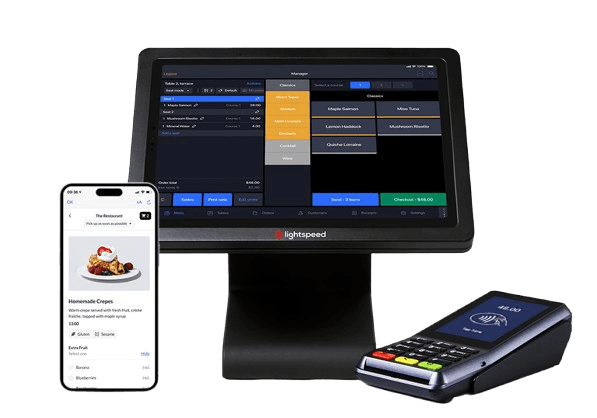
POS System
A POS system is the integrated hardware and software that restaurants use to process transactions, manage orders, track inventory, and coordinate operations, with POS standing for 'point of sale'—the moment and location where customers complete their purchase.
A POS system is the combined hardware and software that restaurants use to process transactions, manage orders, track inventory, and coordinate operations from the moment a customer places an order to payment completion. POS stands for “point of sale,” referring to the time and place where a sales transaction happens.
Modern restaurant POS systems include touchscreen terminals or tablets, receipt printers, card readers, cash drawers, and software that connects front-of-house operations with kitchen staff. The system sends orders directly to kitchen display screens or printers, processes payments, tracks what’s selling, manages employee hours, and generates reports showing daily sales, popular menu items, and labor costs.
Hardware Components
Core POS hardware includes terminals (typically tablets or touchscreen monitors), thermal receipt printers that use thermal paper rolls, cash drawers that open automatically after transactions, and card readers for credit and debit payments. Mobile POS (mPOS) setups use tablets or smartphones that servers carry to take orders and process payments tableside, eliminating trips back to stationary terminals and speeding up table turnover.
Kitchen display systems (KDS) replace paper tickets with screens that show incoming orders, highlight modifications, and track ticket times. This setup reduces errors from handwriting, keeps the kitchen organized during rushes, and provides real-time visibility into which orders need attention.
Cloud-Based vs. Legacy Systems
Cloud-based systems store data on remote servers accessible from any internet-connected device, meaning owners can check sales, update menus, or run reports from home or while traveling. These systems charge monthly subscription fees, update automatically, and require minimal upfront investment. As of 2023, 76% of restaurants use cloud-based POS systems.
Legacy systems store data locally on servers inside the restaurant and require substantial upfront hardware purchases. They need manual updates, only work on-site, and cost more to maintain. The 23% of restaurants still using legacy systems typically operate older establishments or prefer complete data control without internet dependency.
Integration Capabilities
Modern POS systems connect with accounting software to automatically record sales and expenses, payroll systems to track employee hours and calculate wages, online ordering platforms for takeout and delivery coordination, and loyalty programs that reward repeat customers. This integration eliminates duplicate data entry, reduces errors, and creates a unified view of restaurant performance across all channels.
Payment processing happens through PCI DSS-compliant systems that protect customer financial data during transactions. The Payment Card Industry Security Standard sets requirements for how POS systems encrypt card information, store payment data, and prevent unauthorized access.
Historical Development
IBM introduced the electronic cash register (ECR) in the mid-1970s, marking the first computer-based system used by restaurants. McDonald’s partnered with IBM to develop the first POS system specifically designed for fast-food operations in 1974, which standardized order entry and improved transaction speed at high-volume restaurants.
Today’s systems evolved from those early models to include inventory tracking that automatically deducts ingredients as items sell, menu engineering analytics showing profit margins per dish, labor management tools that schedule staff based on predicted busy periods, and customer relationship features that track dining preferences and visit frequency.
Operational Benefits
POS systems eliminate handwritten orders that kitchen staff might misread, automatically calculate totals with taxes and discounts applied correctly, and split checks between multiple payment methods without manual math. Real-time reporting shows which menu items sell best at different times, helping managers adjust prep quantities and reduce waste.
Staff training becomes faster because touchscreen interfaces with pictures and clearly labeled buttons require less memorization than traditional cash registers. Systems also track individual server sales and tips, simplifying end-of-shift checkout and payroll processing. Find essential supplies for your POS system in the Order and Payment Essentials category.
Common Uses
Restaurant managers use POS systems throughout service to ring up orders, process payments, track sales in real-time, and communicate orders to the kitchen. Servers interact with terminals or tablets to enter customer orders with modifications, split checks, and accept various payment methods. Kitchen staff view orders on display screens that update automatically as new tickets arrive. Owners access the system remotely to check daily sales, review reports, update menu prices, manage inventory levels, and analyze business performance across multiple locations.