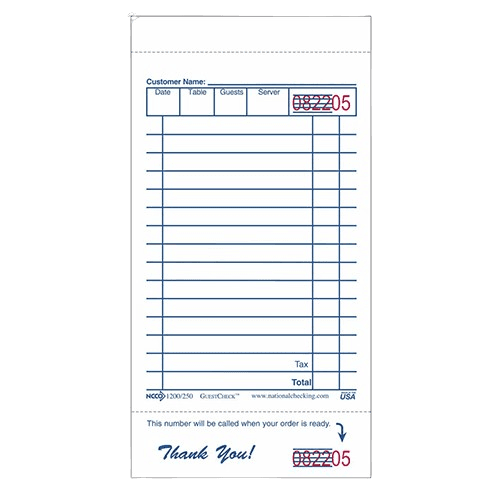
Guest Check
A guest check is a formal documentation form used to record customer orders and present itemized bills in restaurants and foodservice operations, serving as both an ordering tool and a financial record that captures orders, modifications, pricing, and payment details.
A guest check is a formal documentation form used to record customer orders and present itemized bills in restaurants and foodservice operations. It serves as both an ordering tool and a financial record, capturing what customers ordered, any modifications, pricing, and payment details. Whether handwritten on carbonless paper or printed from a POS system, guest checks remain essential for tracking transactions, managing kitchen communication, and maintaining accurate financial records.
Types and Formats
Guest checks come in single-part, 2-part, 3-part, and 4-part configurations depending on operational needs. Single-part checks work for operations with integrated POS systems where electronic records eliminate the need for multiple copies. 2-part systems provide one copy for the register and one for the customer or kitchen.
3-part checks are common in non-POS operations: one copy becomes the customer receipt, one goes to the kitchen as a dupe, and one stays at the register for reconciliation. 4-part systems add copies for bar service or management tracking. The most popular sizes are 3-1/2 x 6-3/4 inches and 4-1/4 x 9 inches, designed to fit standard check presenters and server books stored at the server station.
Key Features and Organization
Modern guest checks include menu prompts—course abbreviations like APP (appetizers), ENT (entrees), and BEV (beverages)—that remind servers to upsell and help kitchen staff time dishes properly. Table diagrams with pivot points or numbered seats let servers match orders to specific guests, eliminating the need to ask “who ordered what” when delivering food.
Sequential check numbers printed on each form serve multiple purposes: tracking orders chronologically, monitoring cash flow, controlling inventory, and reconciling accounts at shift end. These numbers also help the expo verify orders are complete before runners deliver them. Receipt stubs and beverage backers provide additional space for complex orders or bar service.
Carbonless vs. Carbon Technology
Traditional carbon checks use carbon paper inserts between sheets to create duplicates, which leaves messy residue on hands and uniforms. Carbonless checks use micro-encapsulated dye on the back of sheets and clay coating on receiving sheets to create clean copies without carbon paper, keeping servers presentable throughout service.
Carbonless technology has become the industry standard for multi-part guest checks. National Checking Company (NCCO) pioneered this format with their trademarked GuestCheck product line, which remains widely used across the industry.
Beyond Table Service
Guest checks excel in takeout and delivery operations where they provide space for customer names, phone numbers, special instructions, and order numbers. This helps organize staging areas and reduces mix-ups without relying solely on digital systems. They’re particularly valuable during POS outages or in operations running hybrid manual-digital workflows.
As legal records of transactions, guest checks document comped items (which require proper authorization), track covers per shift, and enable analysis of table turn rates. Many operators keep guest checks for accounting periods to support sales reporting and tax documentation.
Common Uses
Servers use guest checks to capture orders tableside, noting modifications, special requests, and seat positions for accurate delivery. In operations without POS systems, these checks route to the kitchen as order tickets and return to servers for presenting bills. Even in fully digital restaurants, many keep paper guest checks as backup during system outages or for quick calculations during busy service. Managers review completed guest checks during shift reconciliation to verify sales totals, track comped items, and analyze service patterns. Guest checks also document takeout and delivery orders, providing space for customer contact information and special instructions that help organize staging areas without relying on digital systems.